 habstick
One habit, several reminder times
A habit supports more than one reminder time, so a morning routine and an evening check-in can share the same habit without sharing the same nudge.
Last updated .
A reminder only helps if it reaches you while there is still time to act on it. HabStick schedules local notifications on your phone, at the times you choose, with gentle copy that names the habit instead of nagging you in the abstract.
A reminder only helps when it lands at the right moment. Send too many and they blur into background noise; send one at the wrong hour and it becomes an interruption instead of a nudge. Most trackers settle this with a single notification time for everything, which is fine until a five-minute morning stretch and an evening journal share the same schedule.
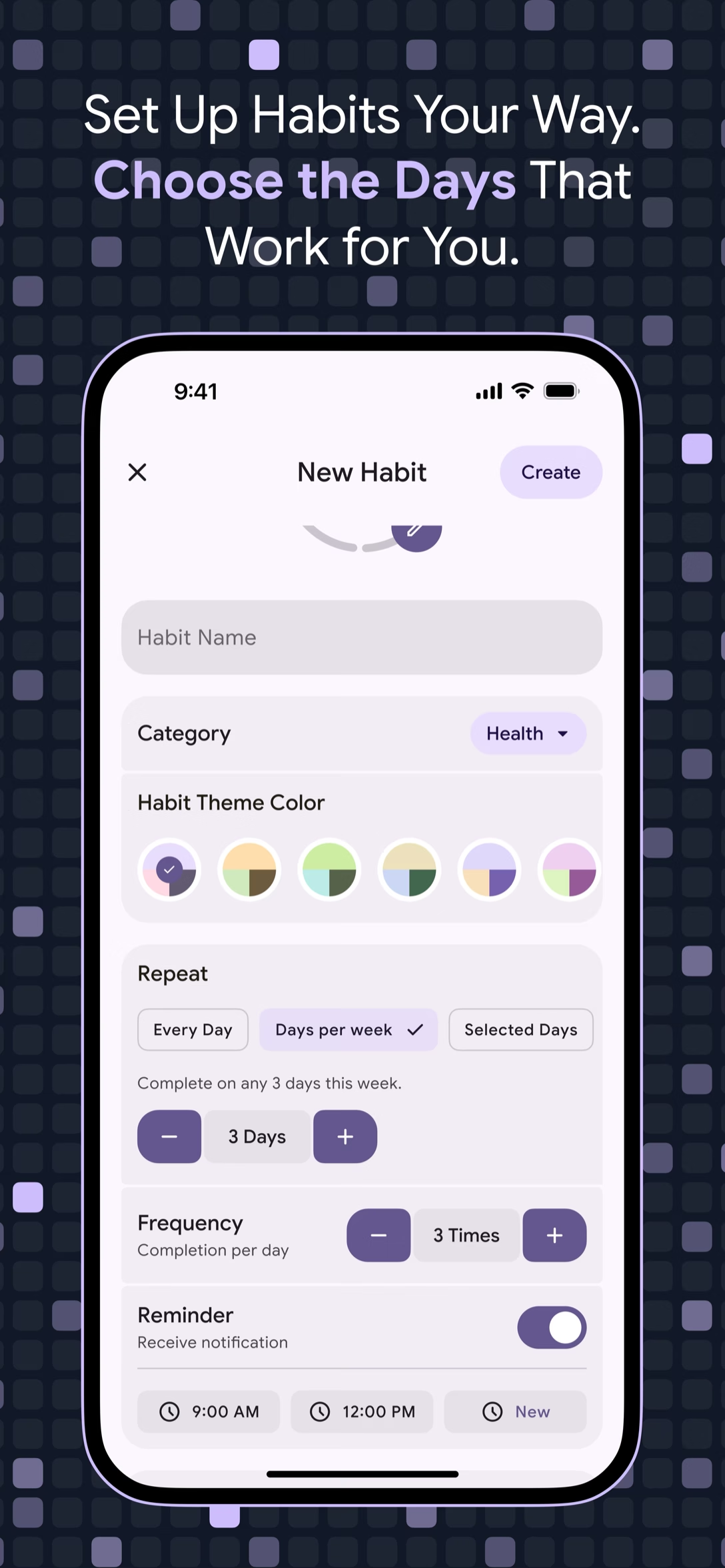
HabStick ties reminders to habits instead. On the New Habit screen, open the Reminder section, switch on Receive notification, and choose a time with the picker—or add several. Each habit keeps its own settings, and the notifications are scheduled locally on the phone: no server push, no account, and they still fire offline. On Android 12 and later, HabStick asks for the Alarms & reminders permission so the notification can arrive at the exact time.
Minimalist design that respects your time and attention.
A habit supports more than one reminder time, so a morning routine and an evening check-in can share the same habit without sharing the same nudge.
Reminders are local device notifications. No server push and no account are involved, and a scheduled reminder fires even when the phone is offline.
On Android 12 and later, HabStick asks for the Alarms & reminders permission so notifications arrive on time, and explains that declining may delay them by minutes to hours.
The copy rotates through a set of gentle, habit-specific messages—Time to Build a Better You!, Just a Gentle Nudge—and the body names the habit.
Nothing here needs a server, an account, or a signal.
A habit supports several reminder times, so one routine can be nudged more than once.
Reminders are edited per habit, so a morning walk and an evening journal never share a schedule by accident.
The Reminder section has a Receive notification toggle, so a habit can stay on your list without buzzing your phone.
Reminder times are set with a time picker on the New Habit screen, next to the rest of the habit’s basics.
Every reminder is a local device notification. No server sits in the middle waiting to wake your phone.
Because scheduling happens on the device, a reminder fires even when the phone has no connection.
Messages rotate through gentle, habit-specific copy, and the body of the notification names the habit.
With the Alarms & reminders permission granted, notifications arrive at the exact time; without it, the app falls back to inexact alarms.
One switch, one time—or several. The rest happens on your phone.
On the New Habit screen, the Reminder section holds a Receive notification toggle and a time picker, so a reminder is part of the habit from the start.
Use the picker to set when the reminder should arrive. A habit can carry more than one time, and each habit keeps its own settings.
The reminder is scheduled locally on your phone. No server, no account, no connection—the notification still arrives when you are offline.
Explore more HabStick capabilities:
Yes. The Reminder section supports more than one time per habit, so a single routine can be nudged more than once.
Yes. Reminders are local device notifications scheduled on your phone, so they still fire when you are offline. There is no server push and no account involved.
On Android 12 and later, HabStick asks for it so notifications arrive at the exact time you chose. The in-app explanation says that without it, notifications may be delayed by several minutes to hours.
HabStick falls back to inexact alarms rather than failing, so your reminders still arrive—just possibly later than the time you set.
The copy rotates through gentle, habit-specific messages—among them Time to Build a Better You!, Stay on Track, Just a Gentle Nudge, and It’s Habit Time!—and the body names the habit.
Yes. Reminders are edited per habit, so a morning habit and an evening habit can run on completely different schedules.
No. There is no login or account involved—reminders are scheduled locally on your phone rather than sent from a server.
Yes. Each habit has its own Receive notification toggle, so you can switch off one reminder without changing the others.
Free to start on iOS and Android. No login, no clutter—just your habits.