 habstick
Every day, any days, or chosen days
Every Day needs no setup. Days per week asks for a count and lets you complete on any of those days. Selected Days asks for specific weekdays.
Last updated .
Every habit has its own rhythm. HabStick lets a habit repeat every day, on any number of days each week, or only on the weekdays you choose—and the streak math follows that choice.
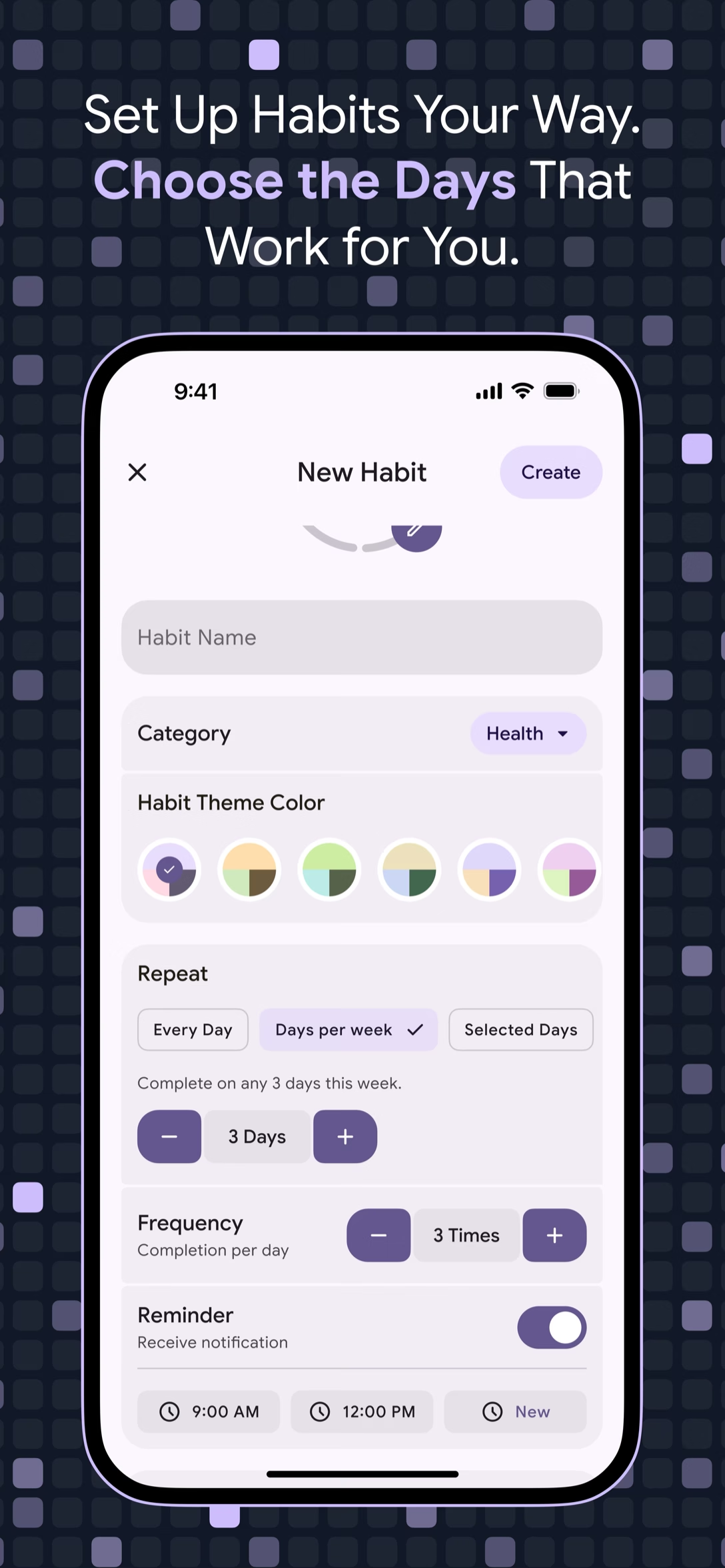
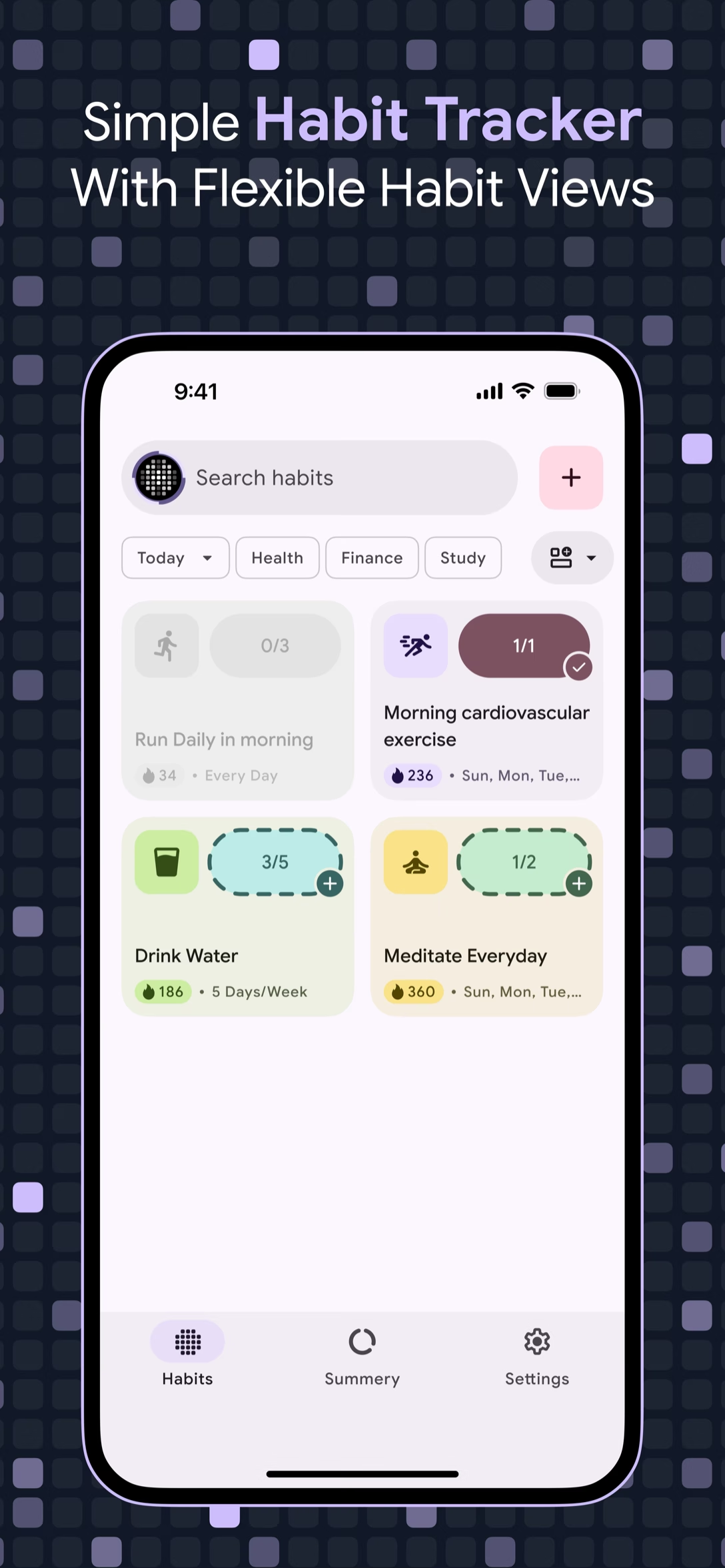
A habit tracker that only understands every day leaves some perfectly good routines out. Five workouts a week, three study sessions a day, or a single Sunday reset do not fit neatly into a daily checkbox. HabStick starts each habit with a repeat choice: Every Day, Days per week, or Selected Days. The schedule belongs to the habit, not to a workaround.
The repeat choice is only half of the schedule. A habit can also require several completions in a single day, and every habit carries a streak rule: Daily, Weekly, or Monthly. The streak math is schedule-aware, so a three-days-per-week habit does not break its streak on the four days you never scheduled. Rest days stay rest days, and the quota is what counts.
Minimalist design that respects your time and attention.
Every Day needs no setup. Days per week asks for a count and lets you complete on any of those days. Selected Days asks for specific weekdays.
The Completion per day stepper sets how many times a habit counts in a day. A three-times target is tracked as three separate completions, not one checkbox.
Daily resets when you miss a scheduled day. Weekly earns one streak for the week’s target and resets if the week fails. Monthly earns one for the month.
Streak calculations follow the repeat you set. A three-days-per-week habit keeps its streak through the four days you did not schedule, because the quota is already handled.
Set the repeat mode once. The streak rule and the math follow it.
The simplest rhythm: the habit is scheduled every day, and the Daily streak rule counts each scheduled day.
Pick a number of days and complete the habit on any of them. The create screen states the quota, for example Complete on any 3 days this week.
Choose the weekdays that suit the routine, and the habit is scheduled only on those days.
Daily resets on any missed scheduled day. Weekly uses the weekly target. Monthly uses the whole month. Pick the one the habit can honestly keep.
Repeat, frequency, reminder, streak rule—then Create.
Start a new habit and open Repeat. Pick Every Day, Days per week, or Selected Days, then set the count or the weekdays.
The Completion per day stepper sets how many completions count as a full day. Switch the reminder on and choose a time if you want a nudge.
Choose Daily, Weekly, or Monthly to decide how a streak is earned, then tap Create. The rule stays tied to that habit’s schedule.
Explore more HabStick capabilities:
Three: Every Day, Days per week, and Selected Days. Days per week uses a count, while Selected Days names the exact weekdays.
Yes. Days per week sets a count and lets you complete the habit on any of those days. Selected Days names the exact weekdays, and the habit is scheduled only then.
Yes. Set the Completion per day stepper above one while creating the habit. Each completion counts toward that day’s target.
Daily resets when you miss a scheduled day. Weekly earns one streak for meeting the week’s target, then resets to zero if the week is missed. Monthly earns one for the completed month.
No. Streak math is schedule-aware: rest days and the days-per-week quota are handled. A three-days-per-week habit keeps its streak on the other four days.
It depends on the streak rule. Daily resets on that missed day, Weekly only resets when the week’s target is missed, and Monthly only resets when the month is missed.
Yes. An existing habit can be edited later, including its schedule. HabStick warns you that the change may affect streaks and calculations.
No. The reminder is optional. The repeat mode, frequency, and streak rule define the schedule on their own.
Free to start on iOS and Android. No login, no clutter—just your habits.